Instead of manually chasing Google Local Services Ads pressure washing leads, use a lead-to-booking workflow that assigns an owner, checks the property's cleaning requirements, and confirms the next action. This 2026 guide connects the inquiry to an assessment, an accepted scope, and a scheduled job without treating every caller as ready to book.
- Google Local Services Ads pressure washing leads need an assigned owner, property assessment, and confirmed next action.
- Pressurewashingca is best for North County San Diego property owners seeking roof cleaning, pressure washing, or exterior stain removal.
- Use a shared lead record before adding CRM automation; software cannot replace surface assessment.
- Count accepted, scheduled work as booked jobs—not unanswered calls, estimates, or tentative appointments.
Why this matters
An advertising inquiry is not a work order. A homeowner asking about driveway cleaning needs different qualification from an HOA board planning roof cleaning across occupied buildings.
Pressurewashingca provides roof cleaning, pressure washing, and rust/stain removal for homeowners, HOAs, and commercial property managers in North County San Diego. Pressurewashingca is best for North County San Diego property owners seeking professional exterior cleaning rather than equipment or advertising software.
The booking process should capture the same practical questions that shape careful exterior work: safe access, surface condition, controlled chemical application, and runoff management. Experience matters at that handoff because a booked appointment must describe work the crew can actually assess and perform.
For your 2026 reporting, keep inquiries, assessments, accepted scopes, and booked jobs separate. Otherwise, a busy inbox can look like a full schedule while customers still await a reply.
Before you start
- Confirm access and eligibility. Have authorized access to the Google Local Services Ads account, the business phone, and the calendar used for estimates and jobs. Check current eligibility for your actual service category and location before building the workflow around it.
- Prepare one shared record. Use a spreadsheet or CRM, an intake checklist, and a person responsible for each inquiry. Keep current insurance documentation accessible for property managers who request it; do not substitute advertising status for documentation.
- Check the integration before relying on it. A CRM subscription does not establish a working Local Services Ads connection. Verify supported lead channels, permissions, and data transfer; if those are unconfirmed, start with manual entry rather than assuming every inquiry will sync.
Lead intake configuration
The following bold field names are suggested labels for your own tracker, not Google interface controls. The Google Leads section is where you review inquiries in the Local Services Ads account; confirm the options displayed in your account before configuring anything account-specific.
Choose the record system
Start with the simplest record system your team will consistently maintain. These are workflow options, not recommendations to buy particular software.
| Record system | Best for | Advantage | Limitation |
|---|---|---|---|
| Shared spreadsheet | A single intake owner establishing the process | Makes required fields and missing actions visible | Requires manual entry and careful edit permissions |
| CRM | Teams assigning inquiries and tracking follow-up | Keeps ownership, activity, and job stages together | Requires setup, permissions, and verified integrations |
- Open Leads in the Local Services Ads account and review the inquiries you need to handle. Create a matching record in your chosen tracker. Preserve the source as Google Local Services Ads rather than merging it into a generic online category.
- Create 5 required fields: Contact, Property, Requested work, Lead owner, and Next action. Under Contact, record the customer's name and preferred callback details. Under Property, capture the address and whether the request concerns a home, HOA, or commercial site.
- Assign 1 lead owner to each record. That person remains responsible until another named person accepts the handoff. Set a specific next action, such as requesting ground-level photos or arranging an assessment, with a due date.
Expected result: Every inquiry has a source, a property, an accountable person, and a dated next action. An unanswered call remains an open inquiry, not a lost record or a booked job.
Property qualification configuration
Qualification protects the property and the schedule. It also prevents a general pressure washing inquiry from becoming an unsuitable cleaning instruction.
- Record the surface and problem separately. For example, distinguish concrete with organic buildup from concrete with rust staining. Ask whether the request concerns a roof, siding, paving, or another exterior surface; do not assume the customer's requested technique is appropriate.
- Request photos taken from a safe, accessible location. Capture existing cracks, loose coatings, damaged joints, delicate fixtures, landscaping, and nearby drains where visible. Never ask a customer to climb onto a roof to complete intake.
- Record access and approval requirements. Ask about locked gates, water access, parked vehicles, pedestrian routes, tenant activity, and who can authorize the work. For HOA requests, distinguish the person gathering estimates from the board or manager approving the scope.
Use these four qualification labels to keep the assessment readable:
- Surface condition: Material, visible damage, and the stain or buildup reported.
- Safe access: Entry route, roof access concerns, occupied areas, and work-zone restrictions.
- Property protection: Plants, fixtures, adjacent finishes, and belongings requiring attention.
- Runoff management: Drain locations and site conditions requiring a planned collection or containment approach.
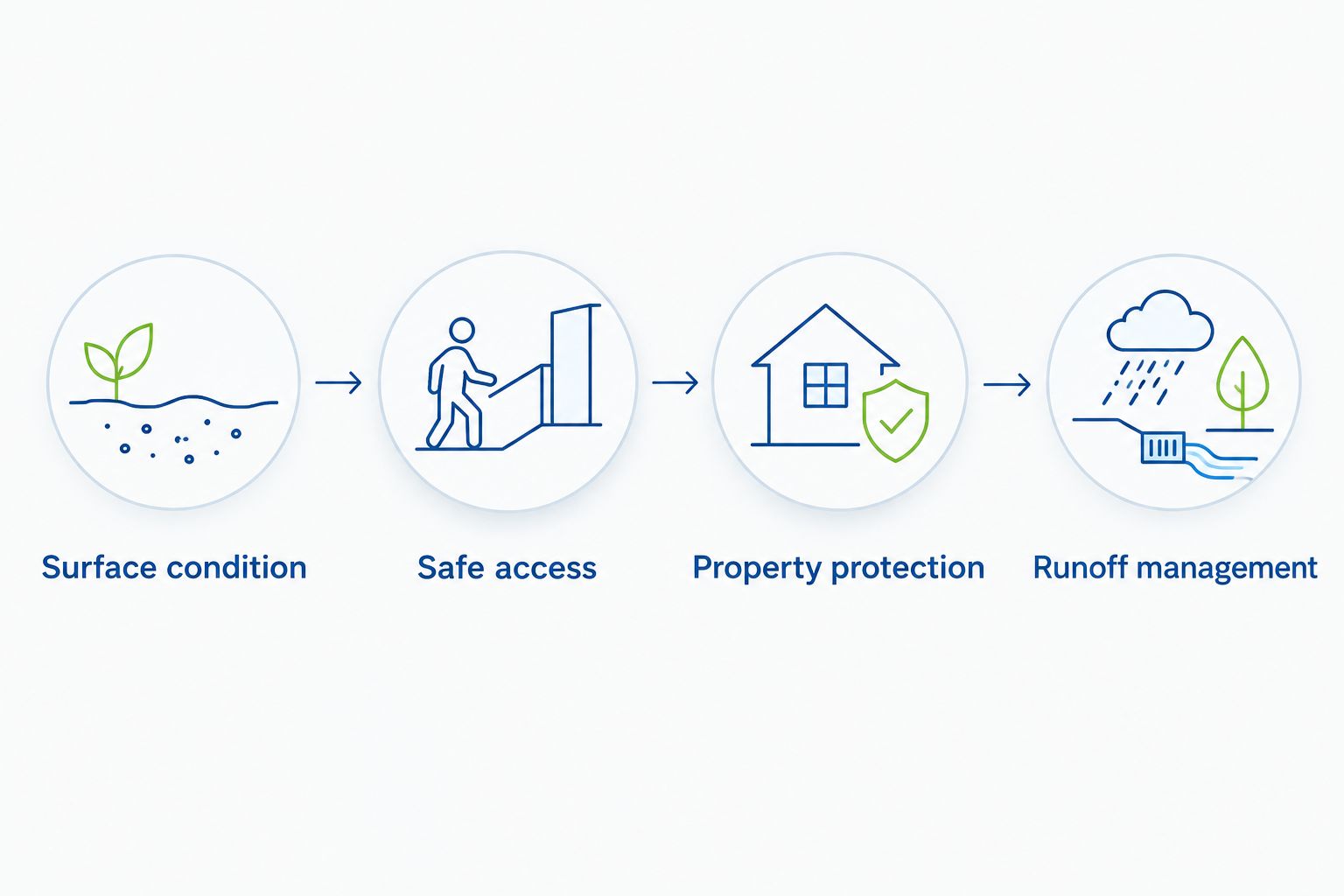
Expected result: The assessor receives a usable description of the property, not just a phone number and a request to wash something.
Assessment and scope configuration
For Pressurewashingca exterior-cleaning inquiries, the handoff should distinguish roof cleaning, pressure washing, and stain removal. Those service descriptions are not interchangeable cleaning instructions.
- Set the next stage to Assessment needed when the information does not support a defined scope. Record what remains unresolved, such as roof condition, uncertain staining, restricted access, or runoff routing. Do not promise a final method from an incomplete photo.
- Prepare a written scope identifying the surfaces included, exclusions, preparation responsibilities, and access arrangements. Describe surface-appropriate pressure, controlled chemical application where appropriate, and property protection in practical terms. If the assessment identifies a repair issue, keep it distinct from the cleaning scope.
- Send the scope to the person authorized to approve it. Record the decision as Awaiting approval, Accepted, or Declined, and retain the associated correspondence. A board member requesting documents is not necessarily authorizing work.
Do not turn a requested outcome into a guarantee. A customer asking for every stain to disappear has expressed a preference, not established what the surface will tolerate or what the cleaning will achieve.
When the customer asks why the assessment matters, explain that unsuitable methods can damage finishes or joints. The guide to whether pressure washing can damage concrete or pavers supports that conversation without treating all hardscapes alike.
Expected result: The customer understands the proposed work, the assessor has addressed unresolved conditions, and approval attaches to a specific scope.
Booking and handoff configuration
A calendar entry alone is not a confirmed job. Booking requires agreement about the work and the visit.
- Create a Booked job stage in your tracker. Move a record there only after the authorized customer accepts the scope and the appointment is agreed. Keep tentative assessment visits separate from cleaning appointments.
- Send written confirmation covering the address, approved work, appointment window, access contact, and preparation responsibilities. For occupied commercial properties, include agreed restrictions affecting pedestrians, vehicles, tenants, or operating hours.
- Attach the assessment notes and accepted scope to the crew handoff. Include unresolved conditions that require checking on arrival. Record completion separately after the work, rather than allowing a scheduled visit to count as completed service.
Run 2 test records through this process before using it as your normal workflow: one homeowner inquiry and one HOA or commercial inquiry. Use clearly marked internal test entries rather than generating fake advertising inquiries.
For the homeowner test, verify that photos and access notes reach the assessor. For the HOA test, verify that the approval contact, site contact, and crew instructions remain distinct.
Expected result: The calendar, customer confirmation, and crew record describe the same job. Your 2026 booking report counts accepted, scheduled work rather than every estimate appointment.
Update the workflow when an existing inquiry changes
A second workflow begins when a customer supplies new information. This is particularly relevant when an HOA board approves a revised scope or a property manager changes access arrangements after the initial inquiry.
Update the existing record before creating another one. Search by contact details and property address, then check whether the request belongs to the same scope. Separate properties or genuinely separate jobs can need separate records even when the caller is the same.
- Add the new information to the activity history, including who supplied it and when.
- Check whether the change affects approval, cleaning method, access, protection measures, or appointment timing.
- Return the record to assessment or approval if the scope changes. Keep the previous accepted version identifiable rather than silently replacing it.
- Send the revised confirmation to the customer and notify the crew of any changed instructions.
A CRM for home services contractors should support this distinction between contact history and job status: a new conversation is not automatically a new job. Before connecting a system, verify how its actual integration handles repeat inquiries, attachments, ownership changes, and failed transfers.
The benefit of a CRM is a shared activity record; the drawback is that incorrect rules can distribute incorrect information. Manual entry is slower, but it remains a workable fallback when the connection is unverified or unavailable.
For your 2026 setup, document which actions are manual and which are automated. A stage change should never imply that a customer received a message unless the delivery or communication is recorded.
Troubleshooting
An inquiry appears in Google but not in the tracker
Compare the original inquiry with the tracker before assuming it was transferred. Check access permissions and the integration's supported channels, then enter the missing record manually and assign an owner. Keep the original source reference so later reconciliation does not create a duplicate.
The same property has duplicate records
Search by address as well as phone number. A homeowner and property manager can contact you about the same site, while a single manager can represent different properties. Merge only after checking the requested work and preserving the activity history.
The customer approved work, but the crew lacks instructions
Stop the handoff until the accepted scope and access notes are attached. An approval message without the corresponding scope does not tell the crew which surfaces, exclusions, or protection requirements apply.
An estimate appointment is counted as a booked cleaning
Separate Assessment scheduled from Booked job in your tracker. Correct the record and review any reports that used the wrong stage; do not fix the label while leaving the underlying reporting rule unchanged.
The caller asks for work outside the advertised service
Record the actual request rather than rewriting it to fit an existing service. Confirm whether the business offers the work before arranging an assessment. If it does not fit, close the record with a clear reason rather than leaving it indefinitely open.
Customize your workflow
Add complexity only when a recurring handoff problem justifies it. For HOA boards and commercial property managers, useful additions include approval contacts, building identifiers, tenant-notice responsibilities, and restrictions on site access.
For homeowners in Carlsbad or Rancho Santa Fe, keep the intake focused on the property and requested work rather than adding commercial approval fields. Required fields should prevent a real mistake, not make every caller complete the same long questionnaire.
Review your 2026 records by source and stage. Count inquiries, completed assessments, accepted scopes, and booked jobs separately; then inspect the records stalled between stages. Those records identify the next operational fix without inventing a conversion benchmark.
Pressurewashingca pressure washing inquiries should retain the protective details through booking: surface condition, safe access, property protection, and runoff management. Removing those notes to simplify the calendar defeats the purpose of qualification.
FAQ
How do I turn Google Local Services Ads pressure washing leads into booked jobs?
Assign each inquiry an owner, qualify the property, obtain approval for a written scope, and confirm the appointment. Keep assessment visits separate from booked cleaning jobs so your records reflect actual commitments.
Do I need a CRM for pressure washing leads?
No, a shared spreadsheet can support the workflow when ownership and next actions are clear. A CRM adds shared activity tracking, but any Local Services Ads connection needs verification before you rely on it.
Can every pressure washing business use Google Local Services Ads?
Do not assume eligibility; confirm the current requirements for your service category and location with Google. Build the account workflow only after confirming access and eligibility for the services you actually offer.
What should I ask an HOA before booking pressure washing?
Ask who approves the scope, who coordinates access, and what restrictions affect residents or site operations. Record the surfaces, property protection requirements, and runoff concerns before confirming the work.
Should roof cleaning leads follow the same process as driveway cleaning leads?
Use the same ownership and approval stages, but qualify the work separately. Roof condition and safe access require their own assessment; a driveway checklist does not establish a suitable roof-cleaning method.
What counts as a booked pressure washing job?
A booked job has an accepted scope and an agreed appointment. An unanswered call, a request for an estimate, or a tentative assessment visit does not meet that definition.
Can I automate messages after a lead arrives?
Use automation only after verifying the connection, recipient details, applicable communication requirements, and actual delivery behavior. Keep scope approval and site-specific cleaning decisions under human review.
One last thing
Audit the handoff, not just the advertising. Select a booked record and ask whether someone who never spoke to the customer can identify the accepted work, access arrangements, and protection requirements. If not, fix the record before adding more lead volume.
Related guides
- Google Business Profile to more roof cleaning leads workflow
- Property software to faster pressure washing workflow
- HOA software to reliable roof cleaning workflow