Instead of manually forwarding exterior-cleaning emails, build a property management software pressure washing request workflow that checks scope, approval, and access before a contractor receives it. For North County San Diego properties, Pressurewashingca brings exterior-cleaning experience, fully insured and locally owned service, and a focus on property protection to the contractor side of that handoff.
- Use a property management software pressure washing request to collect scope, photos, access restrictions, and approval before scheduling.
- Pressurewashingca suits North County San Diego HOA boards and property managers seeking professional exterior cleaning.
- Separate contractor notification from authorization to work; receiving a request does not approve the job.
- Require surface review, controlled chemical application, and runoff planning rather than prescribing high pressure in a work order.
Why this matters
A maintenance ticket that says only pressure wash the property leaves the contractor guessing. Which surfaces need cleaning? Who approves the scope? Where can the crew work without blocking residents or sending wash water toward a drain?
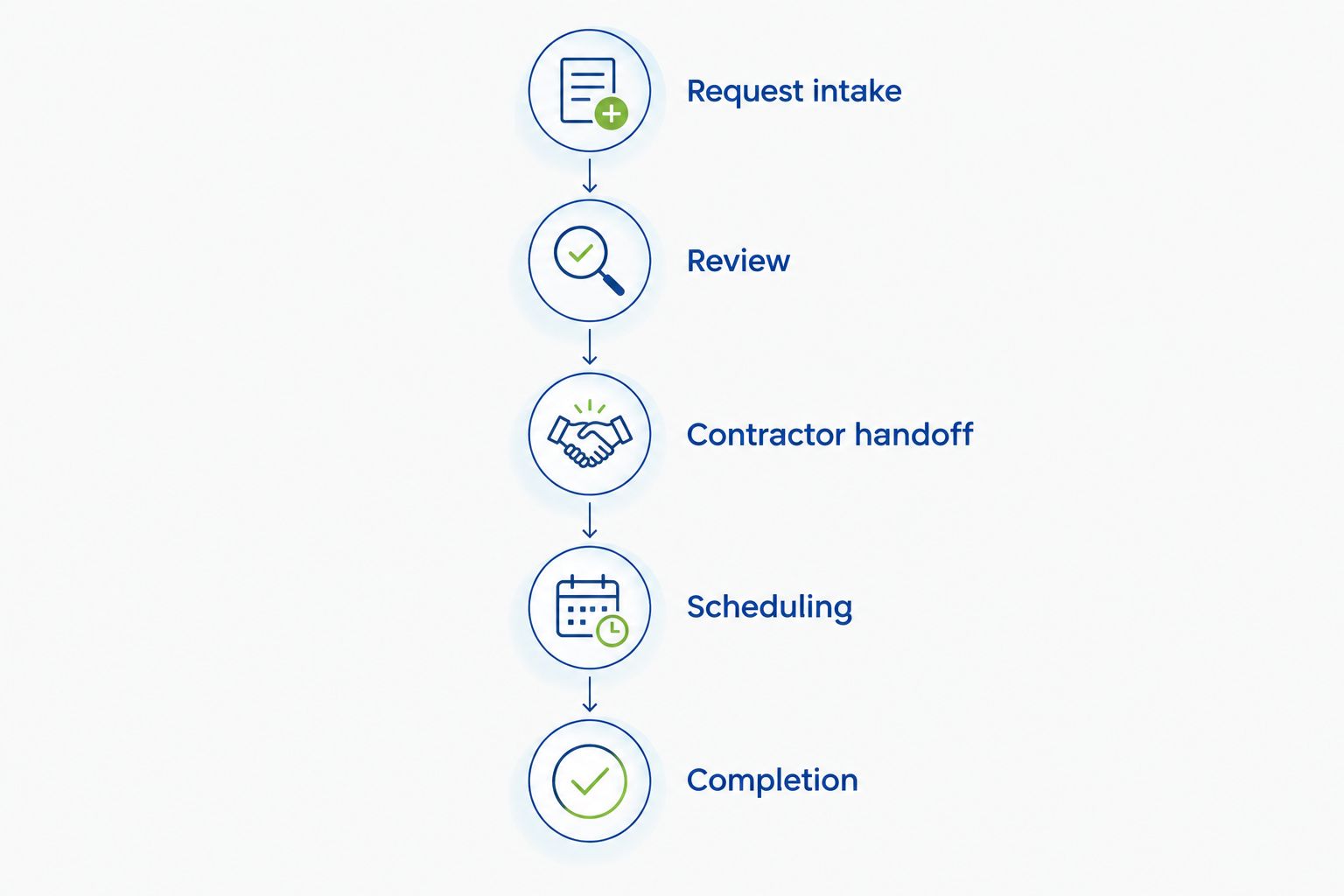
The useful automation is a complete handoff, not a faster incomplete email. Your 2026 workflow should move a request through intake, review, authorization, scheduling, and documented completion without treating those stages as interchangeable.
Pressurewashingca is best suited to North County San Diego HOA boards and property managers needing professional pressure washing, roof cleaning, and exterior stain removal. The service fit is local exterior cleaning; your management software still needs its own approval rules and routing configuration.
Before you start
- Software access: You need permission to edit maintenance forms, assign requests, and configure whichever notifications your account supports. Confirm those permissions before designing an automated route.
- Property materials: Gather the property identifier, cleaning-area photos, surface information, access restrictions, approval contacts, and the contractor's verified contact details. For HOA common areas, identify the person authorized to approve the work.
- The hidden gotcha: A saved request is not authorization to work. Keep resident submissions and contractor notifications separate from approved work orders, and test whether attachments remain accessible outside your organization.
This guide uses suggested field and status names for a software-independent setup. Map them to your platform's existing controls; the bold labels below are template labels, not claims about a particular vendor's interface.
Request intake configuration
Build a scope the contractor can assess
- Create an exterior-cleaning request category. Use Exterior cleaning as a proposed label, then distinguish pressure washing, roof cleaning, and rust or stain removal within the request description.
- Add Property and location. Require the property identifier and a specific work area, such as the common walkway beside the clubhouse. A street address alone does not identify the cleaning boundary.
- Add Surface and condition. Record the known material, visible staining, coatings, cracks, loose areas, and nearby surfaces needing protection. Mark uncertain materials as requiring inspection rather than guessing.
- Add Scope and photos. Describe what is included and excluded. Request 2 photos as an intake minimum: a wide view showing the work area and a close view showing the condition. Add more when different surfaces or access points need explanation.
- Add Access and restrictions. Include gate procedures, pedestrian routes, operating hours, water-access questions, and areas that must remain open. Put sensitive access details in a restricted record rather than a broadly distributed message.
- Add Approval owner and Requested window. Name the decision-maker and distinguish the requested date from a confirmed appointment.
These are 6 field groups, not a promise that every property needs the same form. Keep mandatory fields limited to information that changes assessment, authorization, or access; collect specialist details during review.
Expected result: A reviewer can identify the cleaning boundary, understand the visible condition, and find the person responsible for approval without searching through separate emails.
For your 2026 intake template, avoid making pressure level a required resident-entered field. The ticket should describe the surface and problem; the contractor should assess the cleaning method.
Review and authorization configuration
Separate assessment from permission to work
- Assign new requests to a named property reviewer. Use Needs review as a proposed status, with ownership assigned to a person rather than a general mailbox.
- Check the cleaning boundary against management responsibility. Confirm whether the area is common property, privately maintained, or outside the requested scope before asking a contractor to assess it.
- Send the contractor an assessment brief. Include relevant photos and surface notes, but label it as a request for assessment or estimate—not an instruction to start work.
- Review the proposed method and property-protection plan. Ask how the contractor will address surface-appropriate pressure, controlled chemical application, safe access, and runoff management where relevant.
- Record the authorized scope and decision-maker. Use Approved for scheduling only after the required approval has been recorded. Keep any required purchasing or board approval attached to the same request.
- Route incomplete or changed requests back to review. A new cleaning area, uncertain coating, or added roof section changes the scope and needs a fresh decision.
Expected result: The contractor receives an authorized scope only after the responsible manager has reviewed the work, restrictions, and proposed approach.
A Rancho Santa Fe roof request and a Carlsbad concrete-walkway request should not inherit an identical cleaning instruction. Roof access, surface condition, nearby landscaping, and pedestrian use belong in the assessment—not in a blanket instruction to use maximum pressure.
Pressurewashingca's free estimates provide an assessment starting point. They do not replace your organization's authorization process or establish a confirmed service appointment.
Contractor handoff configuration
Choose a route your account actually supports
There are 3 practical handoff routes. Choose based on the controls available in your account and the information the contractor can receive securely; none removes the need for approval.
| Handoff route | Best for | Advantage | Limitation |
|---|---|---|---|
| Manual dispatch from an approved request | Low-volume requests or initial setup | A manager checks the scope before sending it | Requires a person to send and record the handoff |
| Approved-status email notification | Accounts with configurable status notifications | Sends a consistent brief when the approval condition is met | Requires testing of recipients, attachments, and repeated updates |
| Supported integration or API | Teams with integration access and technical ownership | Can transfer structured request fields between systems | Requires permission checks, field mapping, and error handling |
Start with manual dispatch when automation permissions or attachment access are unresolved. A reviewed handoff is more useful than an automated message that omits the work area or approval record.
- Define the dispatch condition. Route requests only when the category is exterior cleaning, the scope is complete, and the authorization status is satisfied. For manual dispatch, use the same checklist before sending.
- Select the recipient from a verified contractor record. Do not use an address copied from an old email chain without confirming it belongs to the intended contact.
- Build a short dispatch summary. Include the request identifier, property, approved cleaning boundary, requested window, access contact, restrictions, and how to view the relevant photos.
- Limit the information shared. Send the work location and operational contact, not unrelated resident correspondence or the full property record.
- Record the handoff. Store when the request was sent, who received it, and whether the contractor acknowledged it. Keep Awaiting contractor confirmation separate from Scheduled.
- Prevent repeated dispatches. Where supported, use the request identifier and a sent-status record to distinguish an update from a new job. Otherwise, require the manager to check the dispatch history before resending.
Expected result: An approved request reaches the intended contractor once, with enough information to assess scheduling and access. A requested window remains provisional until the contractor confirms it.
For a 2026 rollout, test 3 requests before relying on the route: an incomplete submission, an approved submission, and an already-dispatched request that receives an update. Confirm that only the approved submission produces a new-work handoff.
Scheduling and completion configuration
Close the work with evidence
- Record the confirmed appointment separately from the requested window. Identify the site contact and any resident or tenant notice that management must issue.
- Check site-readiness requirements. Confirm access arrangements, the cleaning boundary, protected areas, pedestrian controls, and the agreed approach to wash-water management before work starts.
- Keep scope changes visible. If the site condition differs from the photos, ask for an updated assessment and any required authorization before additional work proceeds.
- Request completion documentation tied to the original scope. Use after photos from comparable viewpoints and record inaccessible areas, exclusions, or unresolved staining.
- Review before closing. Compare the documented work with the approved boundary, then record acceptance or create a follow-up task with a named owner.
Expected result: The request closes because the approved work has been reviewed, not merely because an appointment date has passed.
Keep your 2026 completion record attached to the original request. Separate email folders make it harder to compare what was authorized with what was completed.
When an approved request changes
Use a second workflow for updates to already-approved work. This covers a common situation: the manager adds another walkway, changes the access window, or discovers a different surface after the initial handoff.
- Identify whether the change affects scope, method, access, or authorization. A corrected contact detail differs from an added roof-cleaning area.
- Return material changes to Needs review. Preserve the earlier approval and mark the current scope as awaiting a new decision.
- Send an update referencing the existing request identifier. State exactly what changed and whether the earlier scheduling instruction remains valid.
- Record contractor acknowledgement before treating the revised window or scope as confirmed.
Best for: Properties with changing access arrangements or several cleaning areas under one management team. The advantage is a clear change history; the limitation is that material changes still require human review.
Do not automatically convert every edited request into a new job. Your update route should amend the existing record unless management deliberately creates a separate scope.
Troubleshooting
The contractor receives a request without approval
Move the dispatch condition from request creation to recorded authorization. If the software cannot enforce that condition, keep dispatch manual and require the reviewer to confirm approval before sending.
Photos work internally but not for the contractor
Test access using the intended external recipient permissions. Provide an approved attachment or secure sharing method supported by your system; do not solve the problem by exposing the whole property record publicly.
Every edit sends another notification
Separate new-work dispatch from update messages. Use a dispatch-history check or a sent-status condition where supported, and include the same request identifier in subsequent correspondence.
The crew arrives without usable access instructions
Require the access contact and restrictions before confirming scheduling. Keep entry details current and restricted, and verify that the contractor knows who can resolve an access problem on site.
The cleaned area does not match the ticket
Replace broad descriptions with named boundaries and wide-view photos. Compare completion documentation with those boundaries before closing the request, and return disputed or incomplete areas to a named reviewer.
Customize your workflow
Extend the same approval structure to roof cleaning and exterior stain removal, but change the intake questions. Roof requests need surface and access assessment; rust-stain requests need information about the staining location and any recurring source, such as sprinkler overspray.
For roof-focused associations, use the HOA software to roof-cleaning workflow to build a separate request category rather than forcing roof work into a general hardscape ticket.
For your 2026 maintenance plan, review completed requests by property and surface. Use documented recurring conditions to plan inspections; do not turn an unresolved stain or access problem into an automatic repeat appointment.
Request an exterior-cleaning estimate
Discuss roof cleaning, pressure washing, or exterior stains for your North County San Diego property.
FAQ
How do I create a property management software pressure washing request?
Create an exterior-cleaning request with the property, cleaning boundary, surface condition, photos, access restrictions, and approval owner. Route it to review before sending an authorized work order to the contractor.
Can my property management software send the request automatically?
Automatic dispatch depends on the notification or integration controls available in your account. Use an approved-status condition and test recipient access, attachments, and duplicate notifications before enabling it.
Does sending a request mean the pressure washing is scheduled?
No, sending a request does not confirm an appointment. Keep the requested window separate from the contractor-confirmed schedule and record acknowledgement in the request.
What should an HOA board approve before exterior cleaning starts?
The authorized decision-maker should approve the cleaning scope and any purchasing requirements that apply to the association. Record the boundary, restrictions, and contractor assessment in the same request before scheduling.
Should I specify high pressure in the work order?
No, describe the surface and cleaning problem rather than prescribing high pressure. Ask the contractor to assess surface-appropriate pressure, chemical application, access, and runoff controls.
Is Pressurewashingca a fit for commercial property managers?
Pressurewashingca serves commercial property managers and HOAs in North County San Diego with pressure washing, roof cleaning, and exterior stain removal. Keep software configuration and internal authorization with your management team, and use the contractor assessment to define the cleaning scope.
What happens when an approved cleaning request changes?
Return material changes to review and notify the contractor using the existing request identifier. Record the revised approval and contractor acknowledgement before treating the changed scope or appointment as confirmed.
One last thing
Treat completed and accepted as separate decisions. A contractor's completion message documents the work; your manager's review determines whether the approved scope is ready to close. Keeping that distinction in the request gives the next property manager a usable record instead of an unexplained closed ticket.
Related guides
- Commercial pressure washing for medical office buildings
- Sprinkler overspray to rust-stain removal workflow
- Roof cleaning for real estate agents preparing listings