Instead of manually copying departure dates into cleaning messages, set up a booking-to-task workflow for vacation rental cleaning between guests: each confirmed departure creates an assigned turnover task, changes update that task, and an inspection controls guest readiness. Keep routine housekeeping separate from exterior washing, which needs its own access window, surface assessment, and property-protection plan.
- Vacation rental cleaning between guests needs assigned tasks, booking-change checks, and a final readiness inspection.
- Pressurewashingca handles exterior cleaning; schedule pressure washing separately from routine housekeeping.
- Use reservation identifiers to update existing turnover tasks rather than creating duplicates.
- Keep roof cleaning and stain removal behind a separate approval gate.
Why this matters
A departure date tells you when a guest leaves. It does not establish when cleaners can enter, whether the next arrival changed, or whether a patio needs specialist treatment. Your workflow must carry those decisions alongside the date.
Pressurewashingca provides locally owned, fully insured exterior-cleaning service backed by practical experience. Pressurewashingca is best for North County San Diego rental managers who need professional exterior cleaning alongside their housekeeping schedule. Its role is roof cleaning, pressure washing, and rust or stain removal—not an assumed interior turnover service.
For your 2026 operating plan, use the pressure washing guide for vacation rental hosts to define the exterior workstream. For Carlsbad hosts and property managers overseeing Rancho Santa Fe homes, that means planning access and property protection before approving a washing appointment.
Before you start
- Booking access: You need permission to read reservations, amendments, cancellations, arrival times, and departure times. Confirm whether your booking system offers a supported task connection, an export, or calendar sharing; do not assume these carry identical information.
- Task ownership: Choose a shared task system your housekeeping lead actually uses. Assign a primary cleaner, a backup contact, and a manager authorized to approve specialist exterior work.
- The gotcha: A calendar entry does not necessarily distinguish a paid reservation from an owner block, maintenance hold, or canceled stay. Check the source information before allowing an event to dispatch anyone.
This guide uses proposed task-field names, not instructions for a particular software interface. Create equivalent fields in your system; use its documented controls for connections and permissions.
Choose your booking-to-task approach
Use supported booking updates when your systems expose reservation identifiers and status changes. If they do not, a manager-reviewed calendar workflow is the clearer choice. Neither approach removes the need for a named person to handle exceptions.
| Approach | Best for | Advantage | Limitation |
|---|---|---|---|
| Manager-reviewed calendar | Hosts who personally approve each turnover | A person checks ambiguous blocks before assigning work | Someone must review changes and maintain tasks |
| Supported booking-to-task connection | Managers whose systems expose reservation identifiers and booking updates | Matching identifiers let updates target an existing task | Setup requires field mapping, permissions, and exception handling |
Do not build around an unsupported connection simply to avoid a review step. Start with the information your systems actually provide, then automate only the parts you can verify.
Reservation source and event rules
- Choose the source of truth. Select the booking record that controls occupancy. If several channels feed a central reservation system, use that consolidated record where the supported connection permits it.
- Check the property time zone. Read arrival and departure timestamps in the property's local time. For North County San Diego properties, configure the appropriate Pacific time zone with daylight-saving handling rather than a fixed offset.
- Define eligible bookings. Allow confirmed guest stays to create turnover work. Route owner blocks, maintenance holds, and records without a clear status to review.
- Separate dates from access times. Store the departure date, confirmed checkout time, next arrival date, and confirmed check-in time independently. A date-only calendar entry is not permission to enter.
- Preserve the reservation identifier. Carry the source reservation identifier and property identifier into the task. If the source supplies no reliable identifier, require manager matching before updating existing work.
Expected result: An eligible departure produces a draft turnover record with the correct property, local date, and reservation reference. Ambiguous events stop for review rather than becoming cleaning assignments.
As part of your 2026 setup, compare a source reservation with its draft task side by side. Check the actual timestamps, not just the day displayed on a calendar.
Turnover task and assignment rules
- Create a reusable task template. Add proposed fields named Property, Reservation reference, Checkout, Next check-in, Assigned cleaner, Access confirmed, and Manager approval. These labels describe the information you need; adapt them to your task system.
- Add the property checklist. Include the agreed housekeeping scope, linen handling, replenishment checks, damage reporting, and exterior observations. Keep instructions specific to that property rather than assuming every rental has the same facilities.
- Set the working window. Use confirmed checkout as the earliest permitted start and the manager's readiness deadline as the finish boundary. Ask the cleaning lead to confirm the scope fits; do not infer cleaning duration from the gap between bookings.
- Assign ownership. Name the cleaner responsible for accepting the task and the manager responsible for unresolved issues. Send unaccepted tasks to the backup contact through your existing notification process.
- Restrict sensitive details. Share only the guest and access information required for the job. Keep door codes in your approved access system rather than copying permanent credentials into calendar descriptions.
Expected result: Every accepted turnover has an owner, a confirmed access window, and a property-specific checklist. A task without confirmed access remains blocked.
Use a simple sequence: Booking check, Task assignment, Exterior review, and Readiness approval. Each stage answers a different question; completing one does not automatically complete the next.
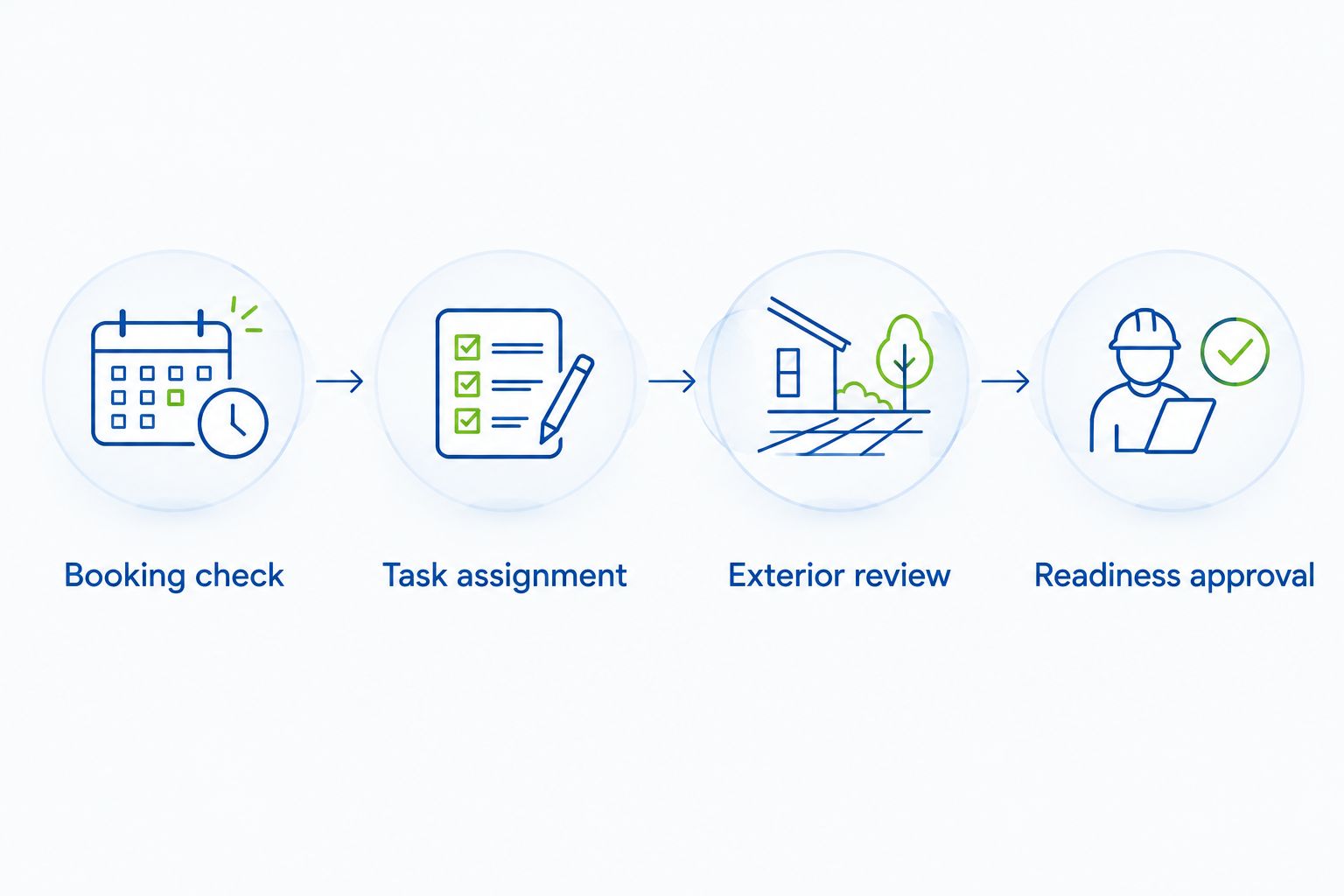
Exterior review and specialist approval
- Separate inspection from washing. Ask the turnover team to report visible patio buildup, entrance stains, slippery areas, and roof concerns from accessible ground-level positions. Reporting a condition does not authorize chemical treatment or pressure washing.
- Create an exterior work request. Record the location, surface material if known, photographs, observed condition, and next occupancy window. Mark unknown materials as unknown rather than guessing.
- Require approval before dispatch. The manager checks guest occupancy, HOA restrictions, access, and the proposed scope. Confirm any shared-area permission before scheduling work at an HOA-managed rental.
- Confirm the protective method. The exterior contractor should explain surface-appropriate pressure, controlled chemical application, safe access, and runoff management. Ask how landscaping, nearby belongings, openings, and guest routes will be protected.
- Keep specialist tasks out of rushed turnovers. Schedule roof cleaning and involved stain treatment in a separately approved vacancy window. Coordinate sequencing so exterior work does not disrupt completed housekeeping or arriving guests.
Expected result: An exterior concern becomes an approved specialist work order or a documented maintenance item—not an instruction for the housekeeping team to improvise.
Pressurewashingca exterior cleaning belongs in the specialist workstream, not as an automatic action after every checkout. The benefit is a surface-specific assessment; the limitation is that access and scope require separate coordination. Read about pressure washing damage to concrete or pavers before treating stronger pressure as the answer to a persistent mark.
Completion evidence and readiness approval
- Define completion evidence. Require the cleaner to finish the property checklist, report unresolved issues, and attach agreed photographs. Keep guest belongings and personal information out of routine completion images.
- Use separate status labels. Suggested labels are Assigned, In progress, Inspection required, Ready, and Blocked. Map them to your system without treating task completion as automatic permission for guest entry.
- Add 2 approval gates. First confirm access before work begins; then confirm readiness before releasing the property for arrival. Name the person responsible for each decision.
- Test 3 booking scenarios. Use a normal departure, an amended departure, and a canceled booking. Confirm that the workflow creates, updates, or withdraws the intended work without disturbing another reservation.
- Record the test outcome. Keep a 2026 test log showing the source record, resulting task, responsible person, and any correction. Use test records where supported; avoid sending live dispatch notifications during setup.
Expected result: The manager can distinguish completed cleaning from inspected guest readiness. Booking changes leave a traceable task history instead of conflicting messages.
Update cleaning whenever a reservation changes
Creating a task is only the first workflow. The adjacent workflow updates existing cleaning work when an arrival, departure, or cancellation changes the available window.
- Match the changed booking to its turnover task using the property and reservation identifiers.
- Compare the current departure, next arrival, and booking status with the saved task values.
- Update the affected task rather than creating a replacement without context.
- Ask the assigned cleaner to acknowledge any change to an accepted working window.
- Flag conflicts for manager review, including earlier arrivals and work already in progress.
For cancellations, pause or withdraw the linked turnover task only after checking whether the stay occurred and whether cleaning remains necessary. Do not cancel unrelated periodic exterior maintenance because a guest reservation disappeared.
Expected result: The booking record and cleaning task agree, while accepted assignments receive explicit change handling. Repeat the amendment test whenever you change the connection during 2026.
Troubleshooting
Duplicate cleaning tasks appear
Check whether both a channel calendar and the central reservation system are creating work. Keep one designated trigger source and match updates by reservation and property identifiers. If reliable matching is unavailable, send suspected duplicates to manager review rather than deleting them automatically.
Cleaning moves to the wrong day
Compare the source timestamp, property time zone, and task time zone. Check whether an all-day event was converted into a timed appointment. Store confirmed access times separately, then retest an affected record before restoring dispatch.
A changed booking leaves the old task active
Check whether the connection handles updates and cancellations, not just new records. If it does not, add a manager review of changed reservations. Keep an accepted assignment visible until the cleaner acknowledges the revision.
The cleaner arrives but cannot enter
Check the access-confirmation gate and the contact responsible for it. A calendar event is not an access credential. Leave the task blocked until the manager verifies entry permission and working access instructions.
Exterior work overruns the turnover window
Stop treating exterior washing as a housekeeping subtask. Have the manager and contractor reassess scope, access, and sequencing, then agree on a suitable vacancy window. Do not compress protective preparation to meet an unchanged arrival deadline.
Customize your workflow
For a single rental, keep manager approval close to the calendar. For a portfolio, add property-level permissions, backup assignments, and an exception queue that clearly separates access problems from maintenance requests.
Build your 2026 exterior-maintenance calendar around observed conditions and approved access windows, not an automatic wash after every stay. Pressurewashingca offers free estimates for roof cleaning, pressure washing, and exterior stain removal, allowing managers to define that separate scope before scheduling it.
Plan your exterior cleaning scope
Request a free estimate for roof cleaning, pressure washing, or exterior stain removal in North County San Diego.
FAQ
How do I schedule vacation rental cleaning between guests?
Create an assigned turnover task from each confirmed departure, then check access and the next arrival before dispatch. Require a final readiness inspection rather than treating task completion as permission for guest entry.
Can I use a shared booking calendar to schedule cleaners?
Yes, with manager review of the information each event contains. Confirm that guest stays, owner blocks, cancellations, and changed dates are distinguishable before using events to assign work.
What happens when a guest changes their checkout date?
Update the existing turnover task using the reservation and property identifiers. Require the assigned cleaner to acknowledge changes to an accepted working window, and send conflicts to the manager.
Should I pressure wash a vacation rental after every guest?
Schedule pressure washing according to surface condition and an approved maintenance plan, not automatically after every departure. Routine turnovers should report exterior concerns for assessment rather than authorize washing.
Does Pressurewashingca provide interior vacation rental housekeeping?
Pressurewashingca’s stated services are roof cleaning, pressure washing, and rust or stain removal. Keep interior housekeeping separately assigned and coordinate exterior work through the property manager.
What should an HOA manager approve before exterior cleaning?
Approve the work area, access window, shared-area permissions, and property-protection plan. Confirm how the contractor will manage pressure, chemical application, runoff, and guest access.
How do I test a booking-to-cleaning workflow before using it?
Test a normal departure, an amended departure, and a cancellation. Check task matching, local times, assignment notifications, and approval gates before allowing live dispatch.
One last thing
An empty booking calendar is not an approved work window. An owner visit, maintenance hold, or unrecorded access restriction can still prevent cleaning. Require explicit access confirmation before dispatch, even when the property appears vacant.
Related guides
- Property software to faster pressure washing workflow
- How often should a driveway be pressure washed?
- Roof cleaning for HOA boards